 EOMeasy
Your month-end, built from your own export
Download the workbook, click Import, pick the CSV your EOMeasy run produced, and the whole month builds itself: cut and fill by volume, gross movement by material and by machine, period against cumulative, and a QA strip showing exactly what the numbers rest on.
It opens already populated with a worked example, so you can see the shape of it before you import anything. Your first import replaces all of it.
Which version should I take?
The two files are the same dashboard. Excel is macro-enabled with a custom ribbon; Google Sheets has the same tools on a menu and a sidebar, because Sheets cannot have a ribbon.
Not sure? Take the Google Sheets one. It works everywhere and needs nothing installed.
| Google Sheets | Excel | |
|---|---|---|
| How you get it | Make a copy link | Download .xlsm |
| Works on | Any browser, desktop | Excel on Windows (built and tested on Excel 16) |
| Setup | Approve the script once | May need unblocking, see below |
| Tools appear as | EOM Easy menu and sidebar | EOM Easy ribbon tab |
| Not supported | Mobile browsers | Excel for Mac, Excel on the web |
Google Sheets: how to run it
- Click Copy Google Sheet above. It opens a "Make a copy" prompt.
- Click Make a copy. You now have your own copy in your own Drive. Nothing you do touches the original, and nobody else can see your data.
- Open EOM Easy → Open EOM Easy Tools from the menu bar, next to Help.
- Click Choose file under Import EOM, pick your export, then click Import.
Google will ask you to authorise the script the first time you click Import
You will see a screen saying the app isn't verified. That is Google's standard notice for any script outside their review programme. Click Advanced, then Go to EOM Easy Tools, then Allow.
The script only ever touches the spreadsheet you are in. It cannot see the rest of your Drive, and your survey data never leaves your own copy: the file is read in your browser and written straight into your sheet.
This version needs a Google account. That is a hard requirement, so if you do not have one or your site does not allow one, use the Excel version below.
Excel: how to run it
- Download the workbook using the button above.
- Open it. The EOM Easy tab appears on the ribbon.
- Click Import EOM and pick your export.
If the ribbon buttons do nothing, Windows has blocked the file
Windows marks anything downloaded from the internet, and Excel blocks macros in marked files. You will see a red SECURITY RISK banner instead of the usual yellow one, and there is no "Enable Content" button to click. This applies to any macro-enabled workbook you download, not just ours.
To fix it:
- Close Excel.
- Find the file in File Explorer, usually your Downloads folder.
- Right-click it, then Properties.
- Tick Unblock at the bottom of the General tab.
- Click OK and open it again.
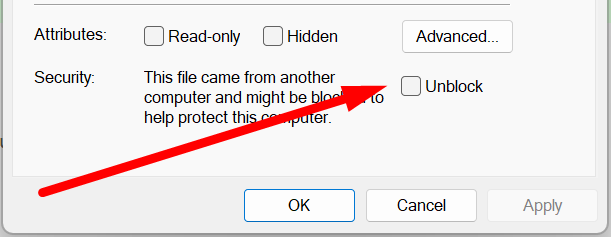
No Unblock tick box? Either the file is already unblocked, or your IT policy has removed it. If the buttons still do nothing after that, use the Google Sheets version instead: same tools, nothing to unblock.
The workbook still opens and displays correctly with macros blocked, because the dashboard is formulas rather than macro output. Only the Import button is dead, so do not assume the file is broken.
What is included, and what isn't
Import EOM is included and works. The other eight tools on the ribbon are built to order: they need your Schedule of Rates, your fleet list, your contract quantities. Click any of them to see what it would do and what it needs from you.
| Tool | What it does | What it needs from you |
|---|---|---|
| Progress Claim (SoR) | Groups volumes by material and area, applies your Schedule of Rates, outputs a claim sheet ready to send | Your Schedule of Rates or BOQ item mapping |
| Contract vs Actual | Compares cumulative-to-date against contract quantities, flags over- and under-runs, projects when each line hits 100% | Your contract quantities per item |
| Truck vs Survey | Reconciles hauled tonnes and loads against survey volumes per destination, using your own density and swell | A haulage or weighbridge export |
| Stockpile Balance | Builds a ledger per pile and flags any whose surveyed closing balance is out of tolerance | Your opening balances and movement records |
| Material & Waste Split | Segregates cut by your material codes, reports productive against waste in volume and tonnes | Your material classification codes |
| Plant Productivity | Volume and tonnes per hour by machine and crew, against rostered hours | Machine hours from dispatch or maintenance |
| Bench / RL Compliance | Compares achieved RLs against design bench levels, quantifies non-compliant volume | Your design bench RLs |
| QA Audit Pack | Assembles coverage, grid resolution, coordinate system, surveyor, surfaces and every check into one formatted pack | Nothing beyond the CSV, just your preferred output format |
Want one wired to your data? Email hello@eomeasy.com and tell us what the manager actually asks for.
Using it, once imported
- Tonnes need a density. Scroll to Gross movement by material below the table and type a density beside any material; the Tonnes column fills in. Densities are remembered by material name, so they survive next month's import.
- A dash in the BCM columns is not an error. EOMeasy only emits BCM where a swell factor is set, so those columns fill in for the volumes that have one.
- Status column:
OK,CHECK(coverage below 98%), orNO SWELL(no swell factor, so no BCM). - Capacity: 250 volumes and 40 distinct materials or machines per import. Beyond that it imports what it can and tells you what it left out.
- Re-importing replaces everything. Import next month's export over the top; the previous month is cleared first, so you never get two months mixed together.
Honest limits
- It works with EOMeasy's CSV export. It is not a general-purpose survey importer.
- The Excel version needs desktop Excel on Windows. No Mac, no Excel on the web.
- The Google Sheets version needs a Google account and a desktop browser. Not mobile.
- The reconciliation maths is real, but the workbook is a demonstration of what a tailored build can do rather than an audit-grade claim tool.